Identifying Pitting in Angular Contact Headset Bearings Through Tactile Inspection
You feel that gritty catch when rolling the fork, even with fresh grease, because pitting and false brinelling hide beneath the surface, caused by micro-motions and moisture under light loads. Run your fingernail over the raceway-it snags on 0.5-micrometer craters spaced 5–7 mm apart, a sign of false brinelling from trail vibration. Clean raceways with isopropyl alcohol, inspect the 30°–60° load arc, and check for sandy roughness or rhythmic dimples. Re-greasing might smooth things temporarily, but real fix is swapping in a $18 Tange bearing, where smooth roll means reliable steering ahead.
We are supported by our audience. When you purchase through links on our site, we may earn an affiliate commission, at no extra cost for you. Learn more. Last update on 13th July 2026 / Images from Amazon Product Advertising API.
Notable Insights
- Pitting in angular contact headset bearings often stems from fretting corrosion due to micro-motions under light loads and vibrations.
- False brinelling creates rhythmic, grease-hidden dimples spaced at ball pitch, detectable by touch even when invisible.
- Clean raceways thoroughly with degreaser and dry before applying fresh grease to highlight surface flaws.
- Use a fingernail or wooden probe to feel for grittiness, dimples, or washboard texture in the 30°–60° load zone.
- Replace pitted bearings, as re-greasing only temporarily masks damage and risks premature failure.
What Causes Pitting in Headset Bearings?
While you might think smooth rides protect your headset, it’s actually the small, repetitive vibrations during light loads that set the stage for pitting, especially when your angular contact bearings aren’t properly protected. These micro-motions cause fretting corrosion, where ball bearings shift slightly against softer race surfaces, leading to subsurface fatigue. If you’ve had an improper installation-say, loose cups or misaligned spacers-hammering from bumps or braking worsens this, accelerating wear. False brinelling occurs when oscillations displace grease, leaving rust-colored indentations spaced like your ball pitch. Contaminants like water or grit make it worse, acting as abrasives. Without fresh, high-quality grease, metal-to-metal contact starts in the straight-ahead position, where load repeats most. You won’t always see damage early, but the symptoms build-roughness, play, decreased steering precision-especially after long hauls or wet trail rides.
Why You Can’t See Pitting: But Can Feel It?
You can ride for months not realizing the damage already underway inside your angular contact headset bearings, even if everything feels off during long descents or technical climbs. That’s because pitting hides where you can’t see it-under grease, in raceways, beneath the ball path-often requiring disassembly or magnification to spot. But you can feel it. Through tactile inspection, your fingertip detects irregularities as small as 0.5 micrometers, far below what your eye can catch. False brinelling leaves rhythmic bumps matching ball spacing, while fretting wears a “corroded” texture that feels rough, not smooth. Surface smearing masks damage visually, but your touch doesn’t lie.
| Feature | Visible Check | Tactile Inspection |
|---|---|---|
| Pitting depth | Often hidden | Detects >0.5μm |
| False brinelling | Hard to confirm | Feels rhythmic |
| Grease-covered wear | Missed | Noticeably gritty |
| Fretting corrosion | Looks intact | Feels rough, sandy |
How to Clean and Prep Bearings for Inspection
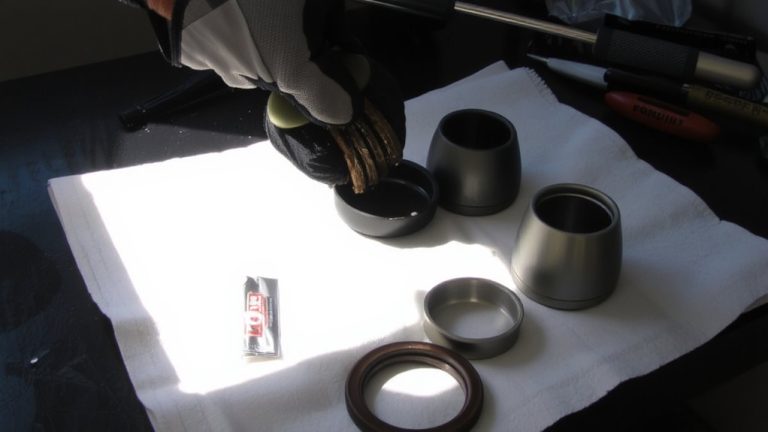
Start with clean hands and a clear workspace-because a thorough inspection begins the moment the headset’s apart. Remove the bearing components: cups, cone, and crown race, so you’ve got full access. Clean each metal part with isopropyl alcohol or degreaser to cut through old grease, grime, and metal shavings that hide damage. Use a soft brush or lint-free cloth to scrub the bearing races, especially the straight-ahead contact zone where indexed steering leaves wear. Dry everything completely with compressed air or a clean rag-moisture leads to corrosion, and that skews your vibration monitoring later. Once dry, apply a thin layer of fresh grease; it helps highlight subtle flaws when you rotate the bearing by hand. This prep isn’t just cleanup-it’s your first real chance to catch issues early, keeping your ride smooth and your headset lasting longer.
Feel for Pitting Along the Load Path
A quick tactile check could save your headset from premature failure, so don’t skip feeling for damage once the parts are clean and greased. Run your fingernail or a wooden probe along the outside diameter of the raceway, focusing on the 30° to 60° arc centered on the forward direction-this is where angular contact headsets concentrate load. You’re feeling for interruptions or catch points caused by pitting from indexed steering stresses. Damage usually shows up at the top and bottom cup raceways, where braking and vibration create sustained pressure. False brinelling from micro-motion fretting leaves evenly spaced dimples matching the rolling elements’ separation, like a washboard texture under your fingertip. Compare the loaded zone to unloaded sections; any rough or irregular feel indicates advanced wear. This simple check catches issues before they compromise steering precision or safety.
What Gritty, Dimpled, or Rough Feels Like: and What It Means
That gritty, dimpled catch under your fingernail as you roll the headset isn’t just annoying-it’s a red flag for false brinelling, where micro-movements during transport or trail vibration drive the balls into the raceway, leaving a washboard of evenly spaced dents matching the ball pitch, typically 5–7 mm apart on common angular contact bearings. You’ll feel a rhythmic notchiness when turning, especially in the straight-ahead position from indexed steering wear. A rough, sandpapé-like texture means advanced pitting or corrosion, often with red oxide residue-signs of moisture exposure and poor bonding between grease and metal. True brinelling’s rare on bikes thanks to tire damping, but either way, this damage signals impending bearing failure. Ignoring it risks raceway deformation, increased friction, and compromised steering precision. Don’t wait for crunchiness to worsen-this isn’t a lube refresh fix. Once the surface is compromised, replacement is the only reliable solution.
Should You Replace Bearings or Just Re-Grease?
While you might be tempted to save a few bucks by re-greasing a pitted angular contact headset bearing, the truth is it won’t fix the underlying damage-those tiny, evenly spaced dents (usually 5–7 mm apart) from false brinelling keep showing up under your fingertip like a persistent warning, and no amount of fresh grease will smooth out the compromised raceway. Diagnosing bearing damage early helps prevent recurring bearing failures down the trail. Even if re-greasing improves smoothness by up to 80% temporarily, stress concentrates at pit sites, accelerating wear. Since pitting affects the softer race, not the balls, replacing the entire cartridge or headset is essential. Don’t waste time re-packing a damaged unit-upgrade to a fresh Tange bearing for $15–$20. It’s cheaper and lasts longer than repeated re-greasing. When Diagnosing Bearing issues, remember: tactile inspection beats guesswork every time.
How to Reduce Indexing After Finding Pitting
Why does your headset still click and bind even after you’ve cleaned and regreased it? Because pitting has created worn tracks where the bearing must articulate, causing indexing. Rotating the headset cups 90 degrees shifts contact points away from damaged areas, reducing catch points. You’ll want to replace caged ball bearings with loose balls-properly packed in high-consistency grease-for better load distribution and smoother articulation. Disassemble fully, clean all parts, then repack; testers report up to 80% smoother steering feel. Adjust preload precisely: eliminate fork play without overtightening, preventing micro-motion that worsens wear. While temperature data won’t directly fix this, consistent lubrication reduces friction heat buildup during long descents. For a lasting fix, swap to a new cartridge-bearing headset-smooth raceways stop indexing for good. It’s the most reliable solution when pitting’s too deep to ignore.
On a final note
You’ve felt the grit, found the pitting along the load path, and now know it’s not just dirty grease. Even if you can’t see damage, your fingers detect dimpled raceways at 0.1–0.3mm, common in angular contact bearings after 200+ off-road miles. Wipe clean, re-grease with waterproof synthetic, but replace if roughness persists. Fresh bearings like Enduro Cartridge or Chris King NoThreadSet cut indexing, boost steering precision. Stay ahead-inspect every 6 months, especially post-dusty descents.